TL;DR:
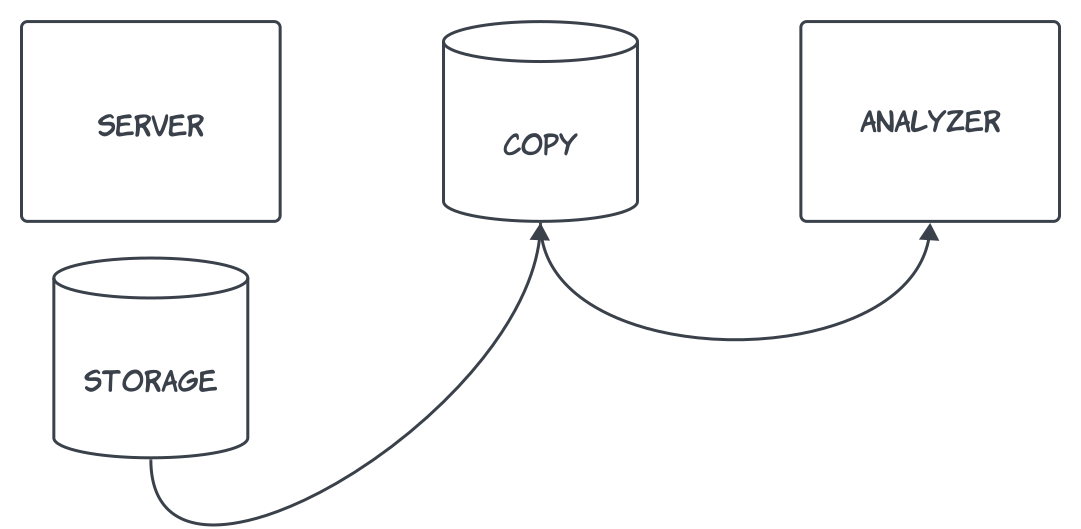
Copy storage of server, mount it on another server, run a vulnerability scan, load results in database, present in a dashboard. Automate process using AWS services and open-source software.
Overview
Vulnerability scanning is a critical component of any cybersecurity program. An organization can identify and remediate security weaknesses in their systems before they can be exploited by malicious actors.
Traditional vulnerability scanning requires the installation and maintenance of software agents on servers. Moreover, supporting infrastructure such as gateways, routing rules and firewall gaps must be introduced to ensure agent traffic reaches the manager.
When thousands of servers spread across multiple cloud accounts are involved, one could see where pain points might arise.
Agentless vulnerability scanning offers an alternative approach by using cloud APIs to copy the storage of the target server and analyze it in a secure environment. This has no impact on the server’s performance, neither does it require any of the above-mentioned infrastructure.
The project
So how do we access the storage of thousands of servers, spread across multiple cloud accounts, and analyze it in a single environment?
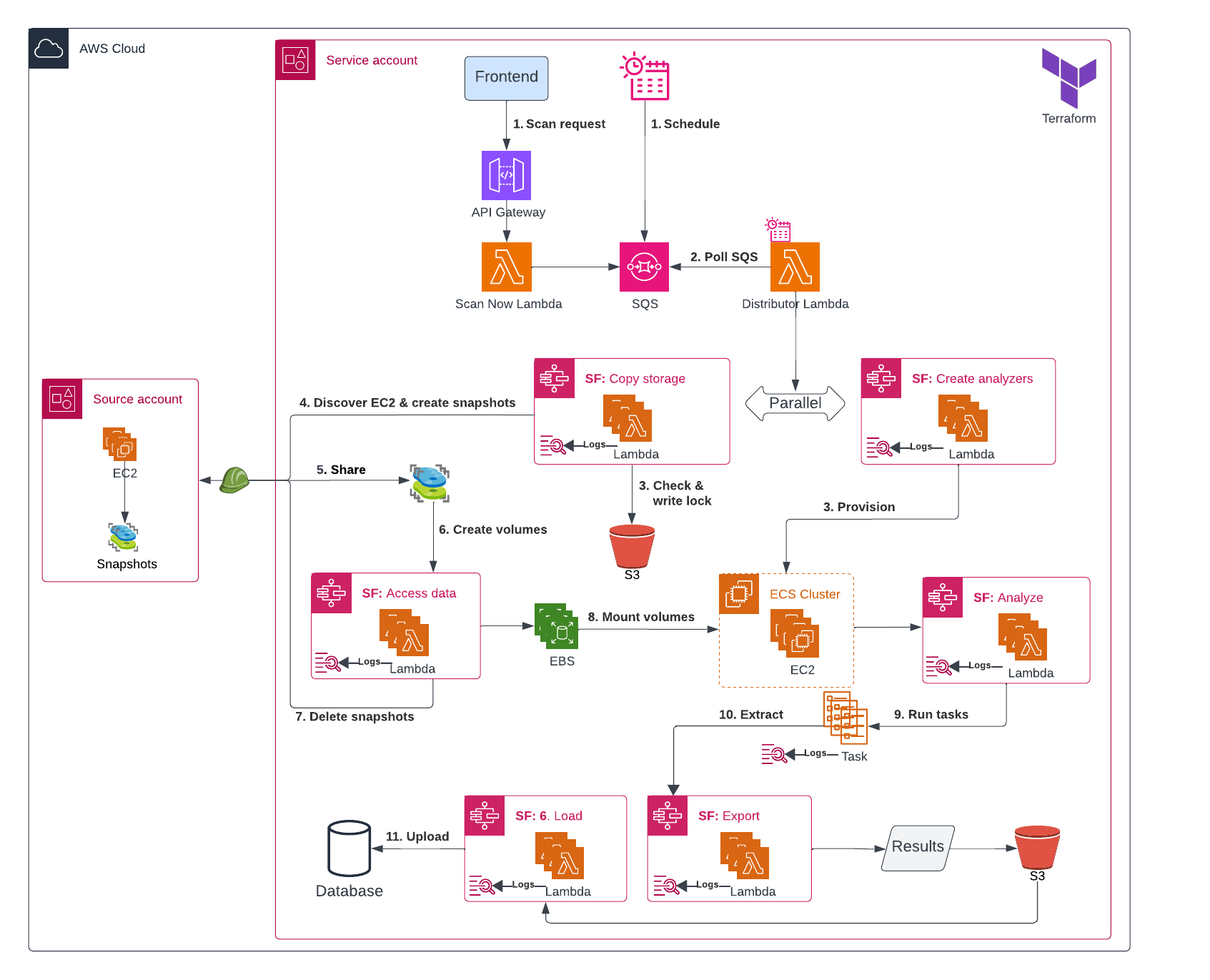
We will use a combination of AWS services to orchestrate the scanning process:
- API Gateway to connect our frontend with the backend
- Step Functions to orchestrate the workflow
- Lambda to execute custom logic like creating snapshots, copying them and starting analysis
- Elastic Container Service (ECS) to run the analysis containers
- S3 to instantiate scan locks, similar to Terraform locks
- Database to store scan results
- CloudWatch Logs to retain execution logs
Workflow
1. Initiate
Scans are triggered in two ways:
- Ad-hoc request - user action in the frontend calls API Gateway, which invokes a Lambda function that sends a message to SQS.
- Scheduled execution - EventBridge sends a message directly to SQS on a predefined schedule.
2. Polling & Task dispatch
A Lambda poller continuously consumes messages from SQS and launches the appropriate ECS task based on the payload.
3. Copy storage
A role is assumed into the source account to asynchronously create encrypted snapshots of the target servers’ root EBS volumes, where the operating system is installed.
The snapshots are then shared with the service account, granting permission to access them and create new volumes from the source account snapshots.
4. Create analyzers
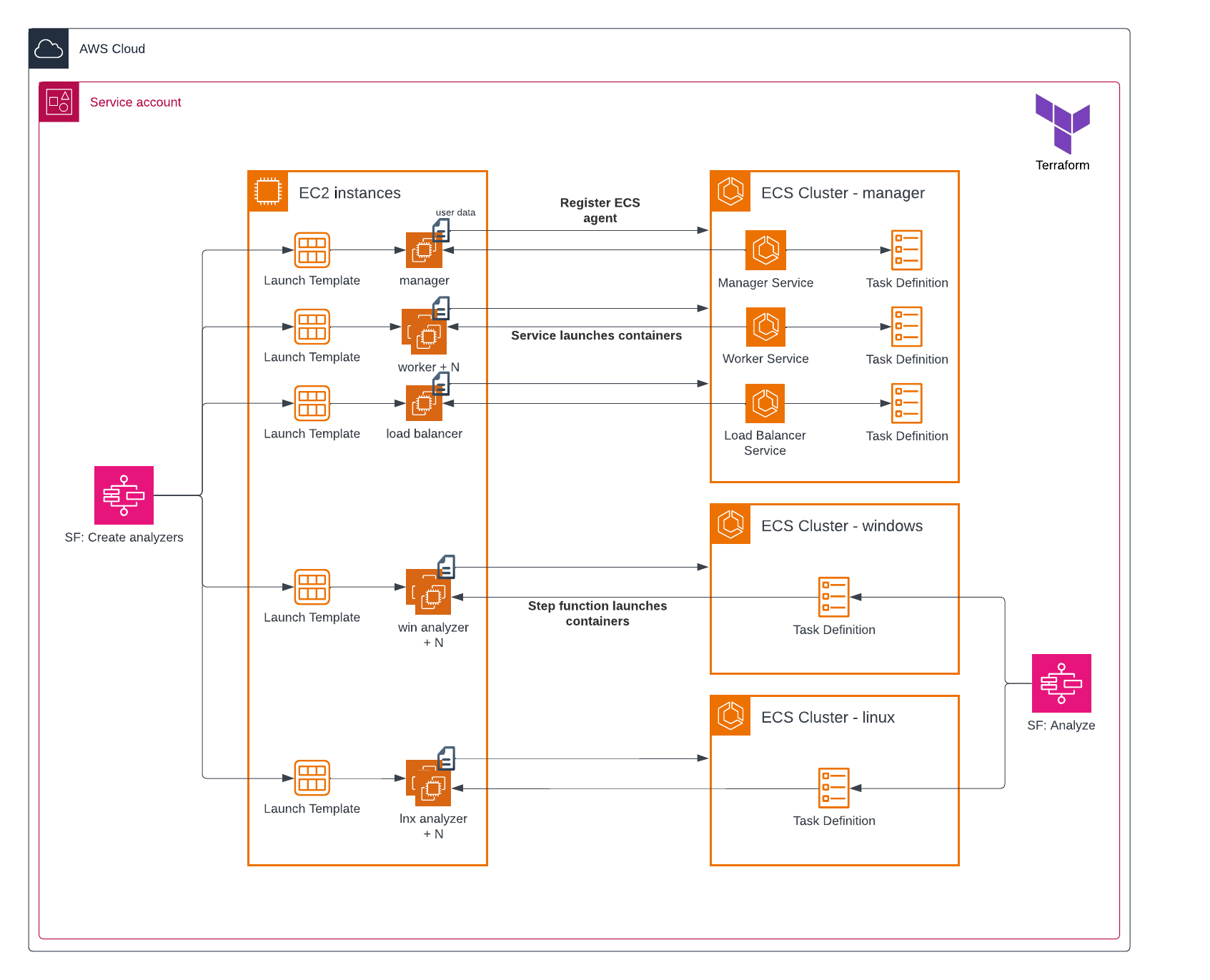
While the snapshots are being copied, the required number of analyzers are provisioned. These are EC2 instances responsible for mounting the volumes and hosting the vulnerability-scanning Docker containers.
The ECS manager cluster contains services which automatically deploy the manager containers onto a host. The windows / linux analyzer clusters do not have services and instead the hosts rely on step 5 to receive containers.
5. Access data
Once the analyzers are ready and the snapshots are shared, new EBS volumes are created and attached to the analyzers.
After the volumes are created, the original snapshots in the source account are deleted to reduce storage costs.
5. Analyze
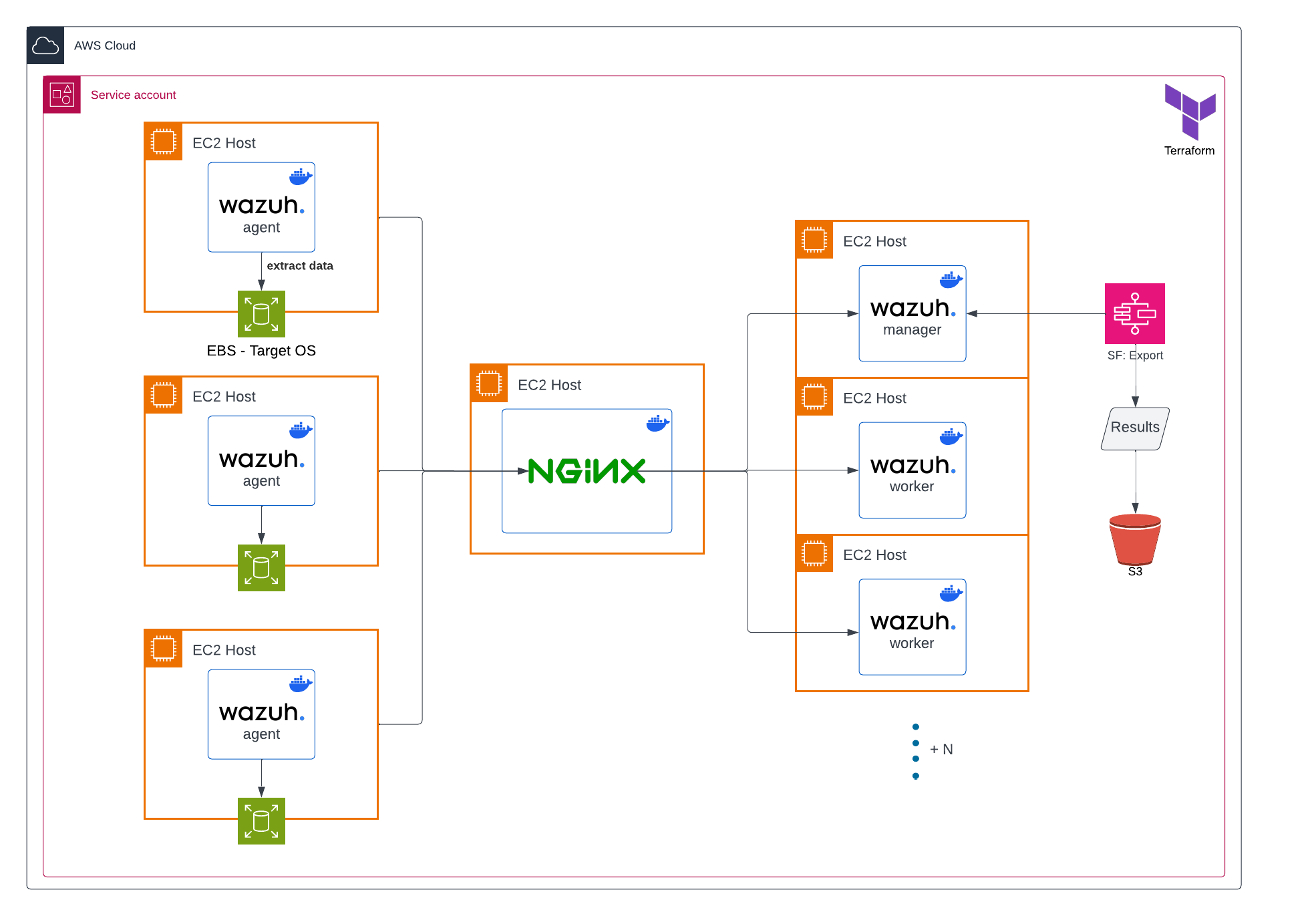
With the analyzers provisioned and volumes attached, a Lambda function deploys a Wazuh container onto each analyzer.
A simplified Wazuh deployment is used, omitting componets such as the indexer and Filebeat. This is because the only requirement is for the agents to inspect the scanned volumes, collect package and operating system metadata, and forward that information to the worker nodes, where installed software versions are matches against known vulnerabilities to produce the scan results.
Each worker is capabled of servicing multiple agents, so cluster capacity is calculated dynamically based on the number of agents.
A temporary NGINX instance sits between the agents and workers as a TCP load balancer. A fresh instance is provisioned for every scan run, discovering relevant manager and worker nodes, and generating routing rules dynamically.
6. Export
A poller monitors the status of the analyzers and, once processing is complete, copies the results to S3.
Each analyzer instance is terminated after the results are exported.
7. Load
Once all analyzers have been terminated, the results are loaded into a database, ready to be queried through a web interface.
Result
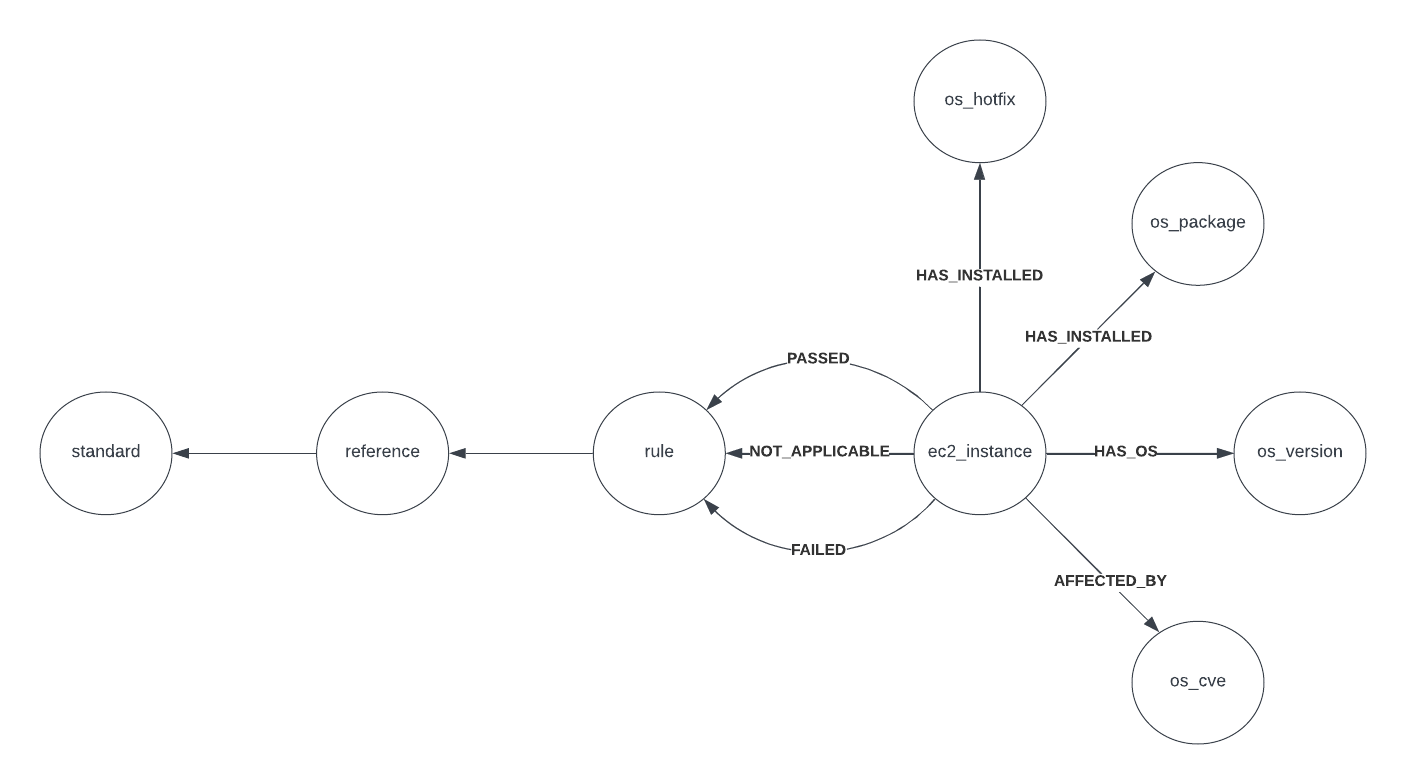
A scan extracts the following information for each server:
- operating system version
- installed software
- detected vulnerabilities
- passed / failed / not applicable CIS benchmarks
With the help of Query Builder from Cloud Security Posture Scanning, this data can be queried and correlated across both infrastructure and application layers. This provides the missing context needed to surface risks that can easily be missed.
Example: A public server with an overly permissive IAM role is running React 19.1 which is vulnerable to unauthenticated remote code execution (CVE-2025-55182). Ding ding ding.
Cost consideration
The scanning cluster is ephemeral, meaning it is provisioned on demand for each scan and terminated once processing is complete. This reduces cost by removing the need to keep thousands of instances running when no scans are taking place.
Further optimization can be achieved through the use of spot instances, or by increasing the number of EBS volumes attached to each analyzer. Currently a one-to-one mapping is used.
Security
Since each analyzer will mount and access volume data from different source accounts - potentially containing sensitive business information - they are deployed in private subnets with no inbound internet access.
The Wazuh agents running on the analyzers are distributed as pre-built Docker images and pulled from a private ECR repository during deployment.
The manager and worker nodes are permitted outbound access to trusted vulnerability feeds, allowing them to update their vulnerability database at the start of each scan.
The software
Vulnerability scanning
Since we’re only focusing on the pipeline and orchestration, we’ll use existing tools for the vulnerability scanning part.
Wazuh is an open-source security monitoring platform that can perform vulnerability scans (and much more) on endpoints. We create a docker image with Wazuh pre-configured to scan the required volumes. It is important to prevent Wazuh from scanning the host system and only focus on the attached volumes.
Later, this docker image is used as the template for the ECS tasks.
Database
To store the results, we use Neo4j, a graph database, allowing us to create relationships between the vulnerabilities and the servers.
This allows us to query the data in a more natural way and visualize it in a graph format. Additionally, it opens up the possibility of running graph queries to identify patterns or risks.
Hold up…
If you can automatically scan thousands of servers without the grunt work, why isn’t the whole world doing it?
There’s always a catch… In the linux world it’s called a pseudo file system (also known as /proc).
When you copy a server’s storage, you’re not copying the server’s memory. This means that any running processes, open files, network connections, etc. are not included in the snapshot. Your scans only get visibility into the server’s configuration and installed software, but not into its runtime state.
Engineers caught up on this and raised it as a red flag. This is why big players in agentless such as Wiz have now introduced agents.
News
The elephant enters the room…
On Nov 27, 2023 AWS announced the release of Amazon Inspector Agentless, a service that takes snapshots of servers and analyzes them in the background.